Zapier
Connect your AI meeting notes to any tool. Fellow's Zapier integration automatically sends summaries, action items, and decisions to thousands of apps — your CRM, project management tools, Slack, and more — without manual effort.
Overview
Fellow's Zapier integration connects your meeting data — AI notes, action items, and talking points — to thousands of other tools automatically. When something happens in Fellow, Zapier can instantly trigger actions in your CRM, project management tools, knowledge base, or communication platforms, keeping your entire stack in sync without manual effort. The integration is available on Team, Business, and Enterprise plans.
How it works
Fellow supports both triggers and actions in Zapier, giving you full flexibility over how meeting data flows in and out.
Triggers — events in Fellow that start a Zap:
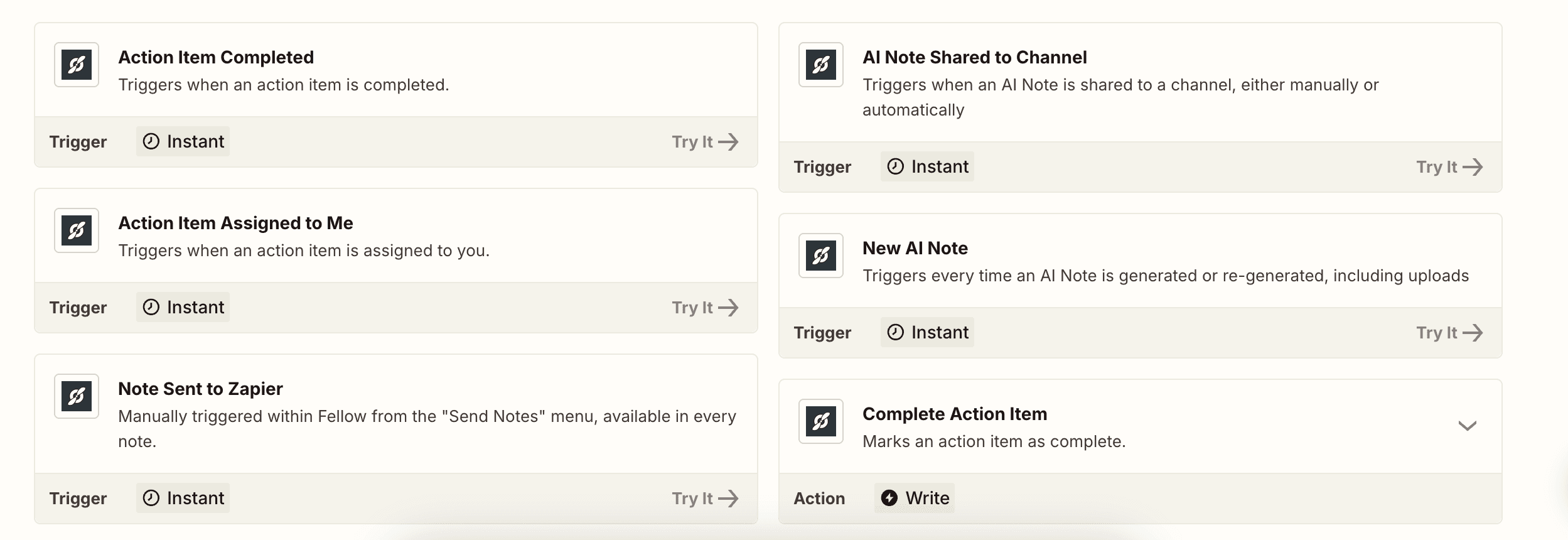
New AI Note: fires every time an AI note is generated after a meeting, including uploaded recordings
AI Note Shared to Channel: fires when an AI note is shared to a channel, manually or automatically
Action Item Assigned to Me: fires when an action item is assigned to you
Action Item Completed: fires when an action item is marked complete
Note Sent to Zapier: manually triggered from the Send Notes menu inside any Fellow note
Actions — things Zapier can do in Fellow:
Add Talking Point: creates a talking point in a specified note series
Complete Action Item: marks a specified action item as complete
Get AI Note: retrieves an AI note by ID
Common use cases
Build multi-step automations: Chain Fellow triggers with multiple actions to create end-to-end workflows, for example: new AI note → log summary in HubSpot → create follow-up task in Asana → post recap to Slack.
Send AI meeting notes to your CRM automatically: Use the New AI Note trigger to create or update records in HubSpot, Pipedrive, or Salesforce after every call, so your CRM stays current without anyone copying and pasting.
Turn action items into tasks in any tool: Use the Action Item Assigned to Me or Action Item Completed trigger to create or close tasks in tools not natively integrated with Fellow, including Airtable, Todoist, or any Zapier-connected app.
Update knowledge bases without manual work: Use Note Sent to Zapier to push individual meeting notes to Confluence, Notion, or an internal wiki on demand, directly from the Send Notes menu inside Fellow.
Post meeting summaries to Slack or Teams: Use the AI Note Shared to Channel trigger to automatically post AI-generated summaries to the right Slack channel or Teams workspace after every meeting ends.

Works where your teams work
Keep your meeting workflow synced with 50+ Fellow integrations