How to Take Meeting Notes Without a Bot in the Room
•
9
MIN READ
AI Summary by Fellow
You're five minutes into a client call when it happens: "Your bot has joined the meeting."
The conversation shifts slightly. Your prospect glances at the participant list. Someone asks whether they're being recorded. You spend the next two minutes explaining your note-taking setup instead of building rapport.
This is the bot problem, and it costs more than just awkward moments. For financial services professionals, legal teams, and anyone running sensitive client conversations, a visible bot in the meeting isn't just inconvenient. It can be a trust breach, or grounds for the IT team to block the tool entirely.
The good news: you don't have to choose between AI meeting notes and a bot-free call. AI meeting assistants like Fellow now capture full transcripts, summaries, and action items without joining as a participant at all.
Already dealing with bot bans or compliance pushback on your current notetaker? Try Fellow free and see how botless recording works.
Why bots could be problematic in professional meetings
The discomfort most people feel when a bot joins a call isn't irrational. There are three concrete reasons why bot-based AI notetakers create friction in professional environments.
Compliance and regulatory restrictions
In regulated industries, this isn't a preference issue. It's a policy one. Private equity and asset management firms operating under SEC oversight are cautious about which third parties receive access to conversation content involving material non-public information (MNPI). Healthcare organizations governed by HIPAA face strict rules about where protected health information (PHI) travels. Legal teams invoking privilege need to control exactly who has access to what.
Many firms have blanket policies prohibiting third-party bot accounts from joining calls, and some have begun requiring IT-level blocking at the platform level.
Social friction at exactly the wrong moment
Even in lower-stakes settings, a bot announcement mid-call creates a speed bump. It pulls attention to the recording, requires explanation, and interrupts whatever momentum you had built.
In a client-facing context, that interruption signals that your process isn't seamless. Small friction points accumulate into perception problems over time.
How botless recording works
Botless recording doesn't require any magic. The mechanism is straightforward once you understand how bot-based tools work by contrast.
Bot-based notetakers work by creating a guest account that your video conferencing platform treats like another meeting participant. That participant joins the call, captures the audio feed from inside the platform, and sends it to the notetaker's servers for transcription. Because the bot is a participant, it's visible to everyone in the meeting.
Botless recording works differently. Instead of joining the call as a participant, the AI notetaker runs as a native desktop application that captures system-level audio directly from your computer. It intercepts the audio stream at the operating system level before it ever enters the video conferencing platform. From every other participant's perspective, no one new has joined the meeting. The call looks exactly the same as it would without any recording tool active.
Fellow works this way. It runs quietly in the background on your Mac or Windows desktop, capturing audio across any video platform without appearing on the participant list.
Methods: all the ways to capture notes without a bot in Fellow
1. Desktop app (Mac and Windows)
The Fellow desktop app is the primary botless capture method. Install Fellow on your laptop, and it will automatically detect when a meeting starts on your calendar and begin capturing audio through native system audio capture. This works across Zoom, Google Meet, Microsoft Teams, and any other video platform you run on your desktop. Because the capture happens at the system level, it's platform-agnostic: if audio is playing through your computer, Fellow can capture it.
Best for: Remote and hybrid calls where you're the host or a participant running the meeting from your own machine.
2. Mobile app (iOS and Android)
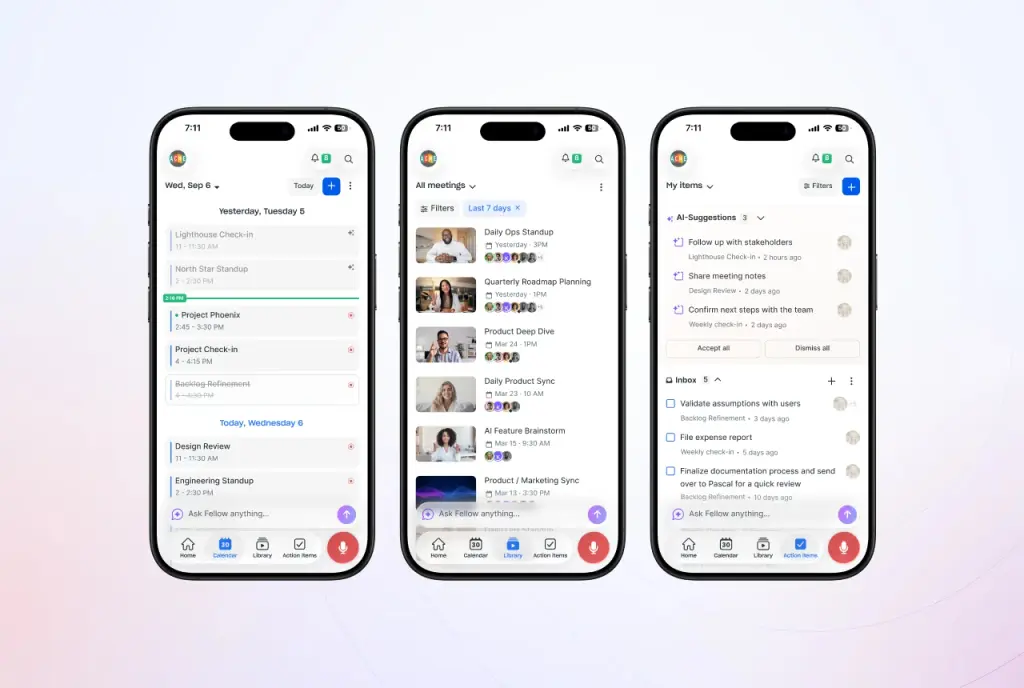
For in-person meetings, client visits, off-sites, and board meetings that happen in a physical room, Fellow's mobile app captures audio directly through your phone's microphone. Speaker diarization labels different speakers automatically, so the transcript doesn't collapse into an undifferentiated block of text.
Best for: In-person client meetings, conference room sessions, one-on-ones that happen face-to-face.
3. Import and upload
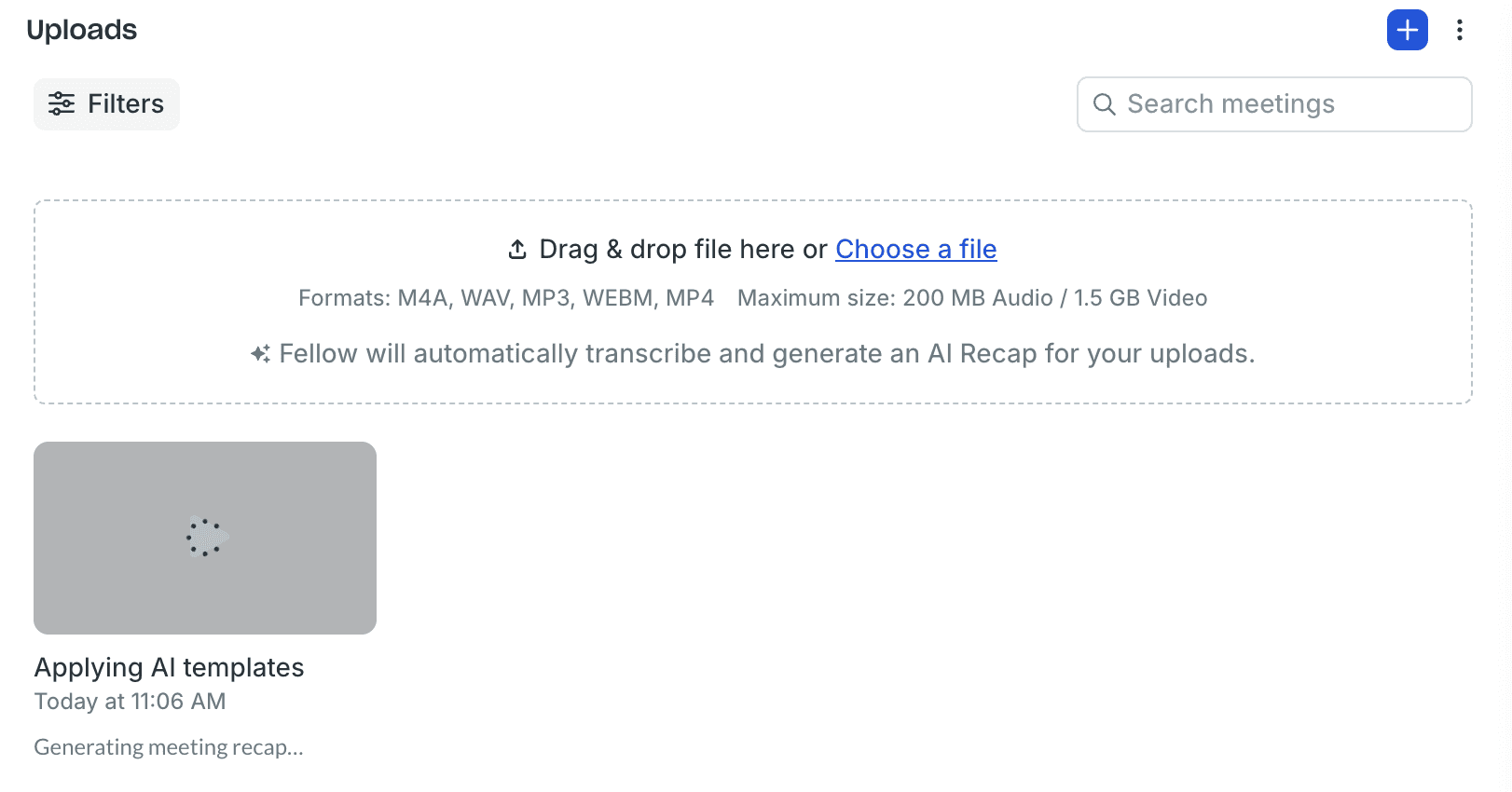
If a meeting happened before Fellow was set up, or if you have an existing recording from another source, you can import the file and run it through Fellow's AI processing to generate summaries, action items, and a searchable transcript. This works as a retroactive capture method for meetings that weren't captured live.
Best for: Catch-up documentation on legacy recordings, uploaded audio from phone-based calls or voicemails.
4. Zoom Native Capture (Zoom only)
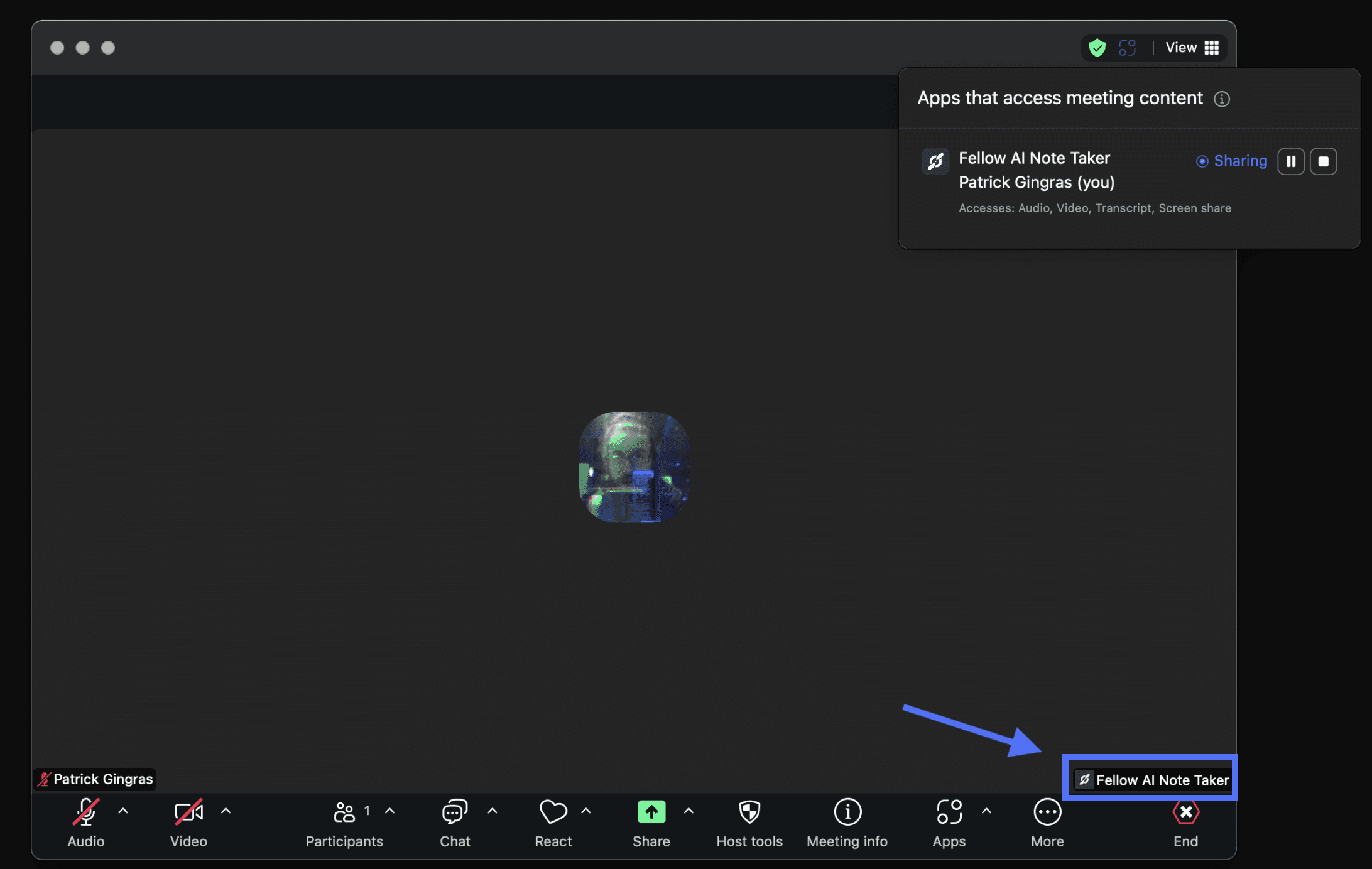
For Zoom hosts who want the cleanest possible botless experience on that platform, Fellow supports Zoom Native Capture (also known as RTMS or Real-Time Media Streaming). Instead of routing audio through your desktop's system capture, this method records directly through Zoom's own infrastructure. No bot joins the call, no guest participant appears on the list, and you still get a full video recording, transcript, AI recap, and action items when the meeting ends.
One thing to note: Zoom does display a built-in notification to all participants that meeting content is being accessed by an app, so everyone on the call is informed.
Setup requires a paid Fellow workspace, a paid Zoom account, and host permissions for the meetings you want to record. Once configured, Native Capture becomes the default recording method for your Zoom calls automatically.
Best for: Zoom-hosted client calls, deal team meetings, and any environment where a bot participant would raise flags but system-level desktop capture feels like a workaround.
Note: Zoom Native Capture works with Zoom meetings only. For Google Meet, Microsoft Teams, or any other platform, use the desktop app method above.
Compliance and privacy controls for regulated teams
For finance, legal, and healthcare readers, capture is only half the equation. What you do with the recording after it's been captured matters just as much. Fellow's privacy controls are designed specifically for environments where governance is non-negotiable.
Zero-day retention
Fellow supports configuring recordings and transcripts for zero-day retention at the workspace level. Once AI processing is complete, the source recording and raw transcript are deleted automatically. Critically, the AI-generated summaries, action items, decisions, and key takeaways persist even after the source files are gone. This means you keep the intelligence without retaining the compliance liability of a verbatim transcript. Retention schedules for recordings and transcripts can be configured independently.
Pause & Resume
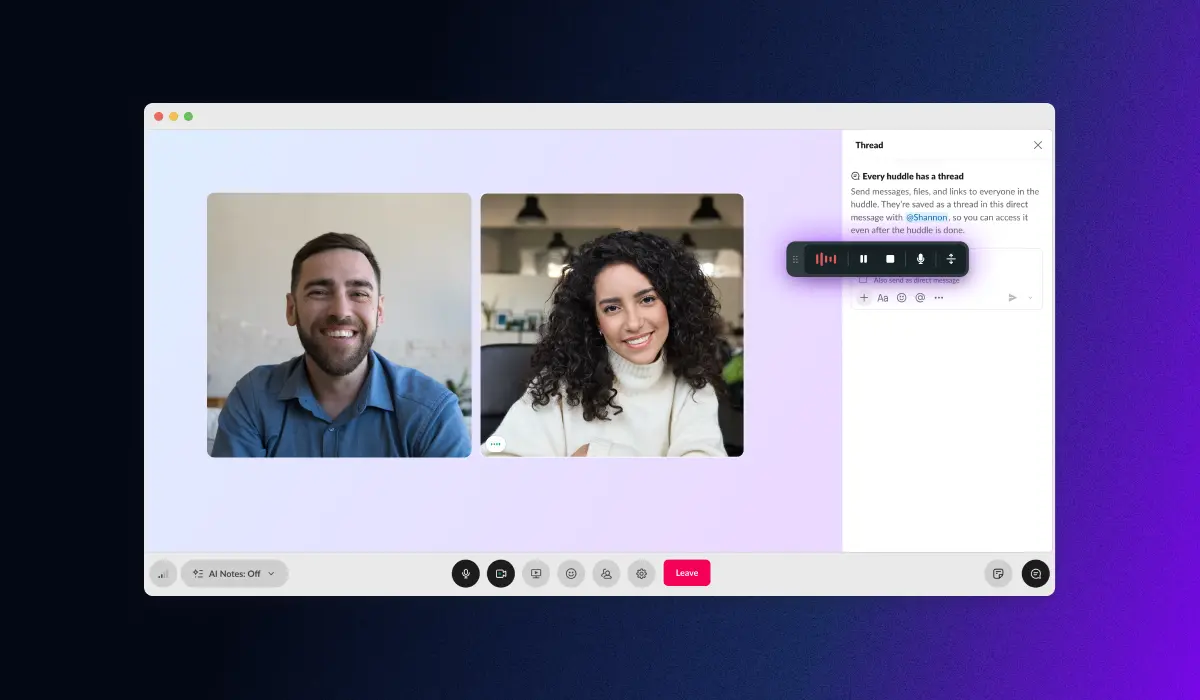
Any meeting attendee can pause the recording or go "off the record" with a single click when a conversation moves into sensitive territory, such as a discussion of non-public information, a privileged legal matter, or a personnel issue. The pause event and its timestamp are independently logged, creating a documented record of what was intentionally not captured. Resume with one click when the conversation returns to non-sensitive ground.
Transcript redaction
Sensitive information including names, account numbers, flagged terms, and NPI can be redacted from transcripts before they're shared or synced to connected systems. Redaction rules can be applied automatically by keyword policy or reviewed manually by compliance staff before distribution.
Access permissioning and RBAC
Fellow's recording library uses role-based access controls so only the right people can view sensitive content. Compliance teams receive workspace-level access to retrieve any meeting record across the organization, which supports regulatory exam readiness without requiring manual assembly.
Certifications
Fellow is SOC 2 Type II certified, GDPR compliant, and HIPAA compliant. Fellow never trains on your data.
If your current notetaker can't offer zero-day retention, botless capture, and transcript redaction in the same product, you're likely patching compliance gaps manually. Book a call to see how Fellow handles this end to end.
Who needs botless recording: use cases by vertical
Financial services (private equity, wealth management, RIAs)
PE deal teams and wealth managers frequently discuss MNPI, client portfolios, and sensitive fund-level information in calls with LPs, counterparties, and advisors. A visible third-party bot in those conversations raises immediate questions about data handling and regulatory posture. Botless capture eliminates the bot exposure entirely, while zero-day retention ensures raw transcripts don't persist as discoverable records. The AI-generated summary and action items remain available for internal use.
Legal teams
Attorney-client privilege depends on limiting who has access to privileged communications. A third-party bot account receiving the audio feed of a privileged conversation is a significant privilege risk. Botless capture, combined with RBAC-based access controls and redaction, gives legal teams a defensible documentation approach without waiving privilege.
Healthcare organizations
HIPAA requires strict controls over who receives protected health information. A bot-based notetaker that routes audio through an external server creates a third-party data recipient that may not be covered under your existing BAA framework. Fellow's botless approach, SOC 2 certification, and HIPAA compliance provide a cleaner path for healthcare organizations that want AI meeting notes without creating new PHI exposure.
Enterprise sales
Client-facing sales calls are where trust is built or lost in the first ten minutes. A bot announcement on a discovery call or executive briefing immediately raises the question of whether your prospect wants to be recorded. Botless capture removes that friction entirely, and the full transcript and AI meeting notes are available immediately after the call for CRM updates and follow-up.
Frequently asked questions
What is botless meeting recording?
Botless meeting recording is a capture method in which an AI notetaker records a meeting by intercepting system-level audio on the host's device rather than joining the call as a guest participant. Unlike bot-based tools, which send an account into the meeting that appears on the participant list, botless tools like Fellow are invisible to other participants and do not require admission to the call. This approach is used primarily in regulated industries and client-facing contexts where a visible bot would create compliance, trust, or policy concerns.
Does Fellow join meetings as a bot?
Fellow gives teams the flexibility to choose betwen bot and botless recording. With the botless recording mode, Fellow records via its native desktop or mobile app using system-level audio capture. No bot account joins your call, and no third-party participant appears on the participant list. From every other attendee's perspective, the meeting looks identical to an unrecorded call. This is what makes Fellow suitable for client-facing calls, compliance-sensitive conversations, and environments where IT has restricted third-party bot access to video conferencing platforms.
Can other participants see that Fellow is recording?
Fellow does not appear as a participant in the call, so it is not visible in the participant panel the way a bot-based tool would be. However, internal meeting attendees using the Fellow desktop app will know Fellow is recording. This keeps internal meetings transparent and ethical while eliminating the privacy risks of ungoverned personal recording tools. Teams can capture discreetly, but never invisibly.
Recording visibility and disclosure practices depend on the policies your organization sets and the consent workflows you configure. Fellow supports customizable consent disclosures that log disclosure events and timestamps, which helps organizations document recording notices for regulatory review.
Is Fellow HIPAA and SOC 2 compliant?
Yes. Fellow is SOC 2 Type II certified and HIPAA compliant, in addition to being GDPR compliant. Security documentation and certifications are available for due-diligence review. Fellow never trains AI models on your data. For detailed security and privacy documentation, see Fellow's privacy controls page.
Can I use Fellow for in-person meetings?
Yes. Fellow captures in-person meetings via the mobile app using the device's microphone, or via the desktop app's microphone input in a conference room setting. Speaker diarization automatically labels different speakers in the transcript, which is particularly useful for multi-person room settings. This eliminates the "video call only" limitation that leaves board meetings, client visits, and off-sites undocumented.
How does Fellow handle sensitive or confidential parts of a call?
Fellow's Pause & Resume feature lets any meeting attendee pause the recording with one click when a conversation moves into sensitive territory, such as a discussion of non-public information, a privileged legal matter, or confidential personnel matters. Any content shared during the pause is not captured in the transcript or meeting notes. The pause event and timestamp are independently logged, creating a documented record of what was intentionally not captured. For post-meeting review, transcript redaction allows compliance staff to identify and remove sensitive information before transcripts are shared or synced to connected systems.
Which AI notetakers don't use a bot?
Fellow is the primary AI meeting assistant that supports fully botless recording across all major platforms, including Zoom, Microsoft Teams, Google Meet, in-person meetings, and Slack huddles, without any guest participant joining the call. Most consumer notetakers (Otter.ai, Fireflies, Fathom) rely on a bot-based participant model. For teams that have evaluated bot-free AI notetakers as a category, Fellow is consistently the option that combines botless capture with enterprise-grade compliance controls in a single product.
Do financial services firms allow AI meeting tools?
Many do, with conditions. The key conditions are typically: no third-party bot receiving sensitive call content, strong data security certifications (SOC 2 Type II is the minimum bar for most PE and RIA evaluations), configurable data retention aligned with the firm's existing records management policy, and no AI training on client data. Fellow is purpose-built to meet all four criteria. For firms navigating specific regulatory frameworks such as SEC Rule 204-2 or FINRA recordkeeping requirements, Fellow's compliance controls and Super Admin API support audit-ready retrieval without manual assembly.
Conclusion
The bot problem is solvable. You don't need to give up AI meeting notes to keep bots out of your calls. You need a tool that was built from the ground up to capture without joining.
Fellow records every meeting as you actually work, across Zoom, Teams, Meet, in-person rooms, and Slack huddles, without appearing as a participant, without a third-party account touching your audio, and without the compliance exposure that bot-based tools create. Summaries, action items, and searchable transcripts are available immediately after the call. Source recordings and raw transcripts can be deleted on your schedule, including at zero days, while the intelligence stays intact.
Ready to try an AI meeting notetaker that stays out of the room while staying compliant? Start your free trial and capture your next meeting without a bot in sight.
Record, transcribe and summarize every meeting with the only AI meeting assistant built with privacy and security in mind.