Automate Your Meeting Workflows with Fellow and n8n
•
6
MIN READ
AI Summary by Fellow
When you use an AI meeting notetaker, one of the biggest wins is what happens during the meeting itself. AI meeting notes mean you're walking away from every call with a clean summary, clear action items, and a full record of what was decided, without anyone having to furiously take notes or piece together a recap afterward.
But what happens to all of that information once the meeting ends? Action items need to land in the right project management tool. Notes need to find their way into your knowledge base. Your CRM needs to reflect the customer conversation you just had. Your team needs a summary in Slack. The meeting might be done, but the admin work that follows it is just getting started, and doing all of that manually, across multiple tools, adds up fast.
That's the gap that automation fills. And with n8n’s new Fellow node, you can connect your AI meeting notes and action items directly to the rest of your stack, so the moment a meeting ends, everything that needs to happen next goes off like clockwork. No context switching, no dropped balls, no manual effort.
What can you do with n8n’s Fellow node?
Connecting Fellow to n8n unlocks a whole range of automations that take the manual work out of your post-meeting routine. The beauty of it is that once a workflow is set up, it runs automatically. Here are some of the most popular use cases:
Sync AI notes to your knowledge base
When Fellow generates an AI meeting note, n8n can automatically create or update a page in Notion, Confluence, or wherever your team stores information. Your knowledge base stays up to date after every meeting, without anyone having to remember to do it. Over time, this means you build up a searchable, organized record of every important conversation your team has without any of the admin overhead that would normally take.
Route action items to your project management tool
Convert Fellow action items into tasks in Linear, Asana, ClickUp, Monday.com, or any other tool your team uses. Action items go straight from the meeting to the right board, assigned to the right person, ready to be worked on. It closes the gap between "we agreed to do this" and "it's actually on someone's plate," which is often where follow-through breaks down.
Post meeting summaries to Slack
Keep your team in the loop by sending a formatted summary to the right Slack channel the moment a meeting wraps up. It's an easy way to maintain visibility across the team, especially for people who couldn't make it to the call. Instead of relying on someone to write up and share a recap (which often happens hours later, if at all) the summary lands in Slack automatically while the conversation is still fresh.
Log meetings in Google Sheets
Track meetings over time in a spreadsheet for reporting, analysis, or just peace of mind. This is useful for teams that need a simple audit trail or want to spot patterns in how time is being spent. If you're managing a large team or reporting up to leadership, having that data automatically collected in one place makes it much easier to pull together insights without digging through calendars or notes.
Update your CRM
After a customer call, automatically sync your AI notes and action items to your CRM so nothing falls through the cracks. Your account records stay current without anyone having to manually log the conversation after the fact. For customer-facing teams especially, this is a game changer; your reps can stay focused on the relationship rather than the admin, and your CRM actually reflects what's happening in the field.
Build multi-step automations
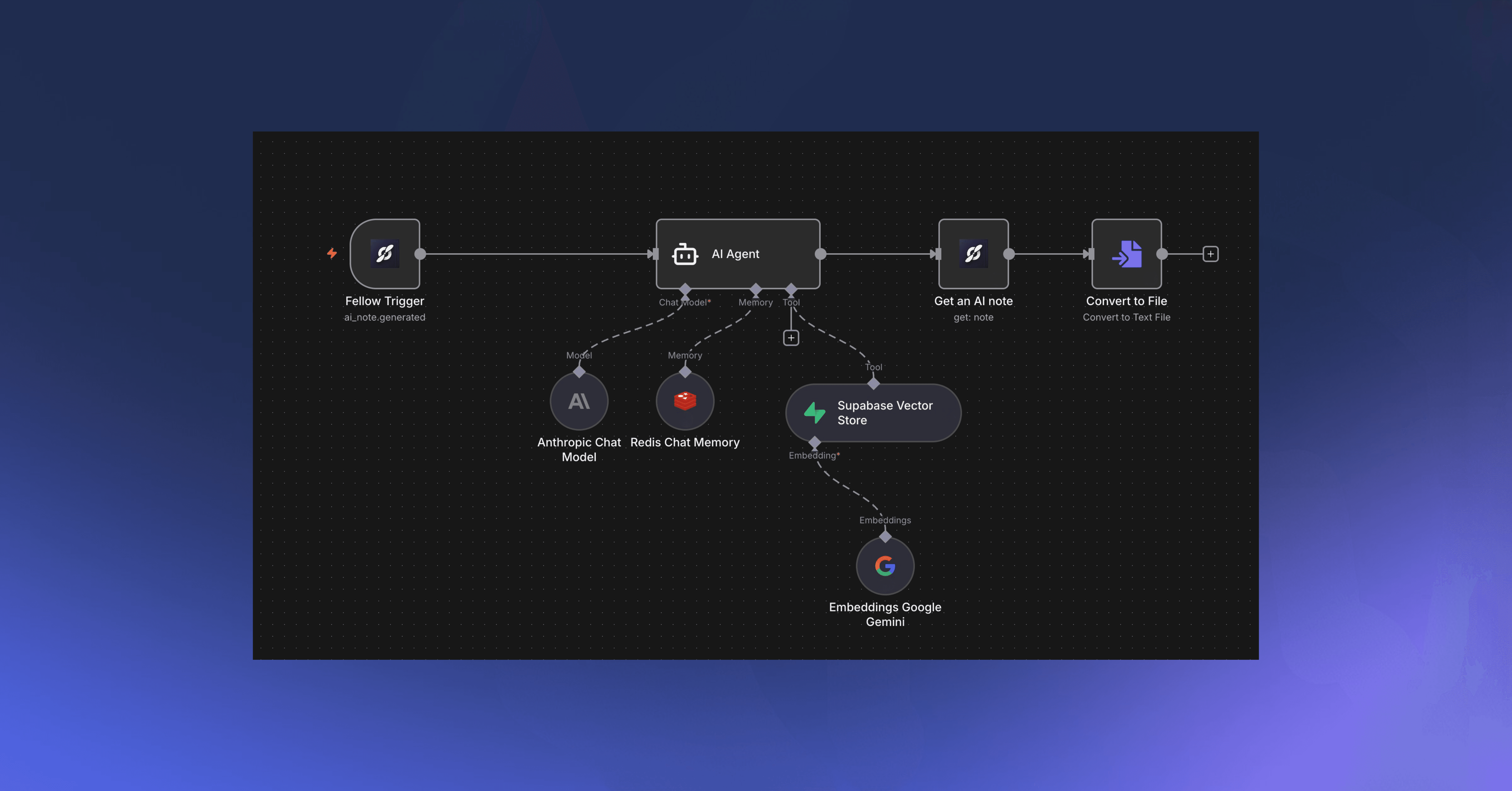
The real power of n8n is chaining actions together. For example: when an AI note is generated, you can have n8n create a Notion page, post a Slack summary, and create follow-up tasks in Linear, all in one workflow. Once it's set up, your entire post-meeting process runs on its own. What used to take 15–20 minutes of manual work after every meeting just happens, every time, without anyone thinking about it.
Getting set up
Getting connected is straightforward. You'll need an active n8n account and a Fellow account on the Solo, Team, Business, or Enterprise plan. From there, it's a matter of installing the Fellow node in n8n, generating a Developer API key in Fellow, and pasting it into your n8n credentials. For a full step-by-step walkthrough, check out the help center article here.
Once you're connected, here's what you can build.
Building your first workflow
Every n8n workflow starts with a trigger, the event that kicks everything off. Fellow supports four real-time webhook triggers, each opening up a different set of automation possibilities. Here’s how to get started with these triggers:
AI Note Generated
This trigger fires the moment Fellow produces an AI note after a meeting. Since the note contains a full summary of what was discussed, it's the ideal starting point for any workflow that's about capturing and distributing information.
Some ideas to get you started: automatically create a Notion or Confluence page from the note so it lands in your knowledge base without any manual effort; post a formatted summary to a Slack channel so stakeholders who weren't in the room are instantly caught up; or log the meeting to a Google Sheet if you're tracking activity over time for reporting or analysis.
AI Note Shared to Channel
This trigger fires when an AI note is shared to a Fellow channel you have access to. The key difference from the previous trigger is context — you know this note was intentionally surfaced to a specific audience, which makes it a great signal for targeted automations.
For example, if your team has a dedicated channel for customer meetings, you could use this trigger to automatically push those notes into your CRM, keeping account records fresh without anyone having to remember to do it manually.
Action Item Completed
This trigger fires when an action item in Fellow is marked as complete. This means something got done, and often there are downstream steps that should follow.
You might use this to update a linked task in your project management tool, send a notification to a Slack thread, or log completed items to a tracker that gives your team visibility into progress over time. It's also a great building block for more complex workflows: for instance, completing a specific type of action item could automatically kick off a follow-up task for someone else.
Action Item Assigned to Me
This trigger fires when an action item is assigned to you in Fellow. Rather than relying on people to check Fellow regularly, you can use this to bring the assignment to wherever you already work.
A simple but powerful use case: automatically create a task in your personal to-do app or project management tool whenever you're assigned an action item in Fellow, so your task list stays in sync without any extra steps.
After choosing your trigger, add an action node for the app you want to send data to, map the fields from Fellow's output, and save. n8n makes it easy to test before going live: click Test workflow, perform the trigger action in Fellow, and review the results. Once everything looks right, toggle the workflow to Active and it'll run on its own from there.
You can also use Fellow as an action rather than a trigger, pulling data on demand, like fetching all incomplete action items to build a weekly digest.
Ready to try it?
The Fellow node is available on n8n cloud now. The moment you activate a workflow, your meeting data starts working for you in real time; notes land where they need to go, action items show up in the right tools, and your team stays informed without anyone lifting a finger. Whether you're looking to save a few clicks after every meeting or build a fully automated post-meeting workflow, n8n gives you the flexibility to make it happen.
Record, transcribe and summarize every meeting with the only AI meeting assistant built with privacy and security in mind.