AI Meeting Minutes: How to Automate Your Meeting Documentation
•
8
MIN READ
AI Summary by Fellow
Every meeting generates valuable information: decisions made, tasks assigned, problems identified. But without proper documentation, that intelligence disappears the moment everyone hangs up.
AI meeting minutes are automatically generated summaries of meetings that capture key discussions, decisions, action items, and participants without requiring anyone to manually take notes. Unlike traditional meeting minutes that rely on someone typing while trying to stay engaged, AI meeting minutes use transcription and natural language processing to document everything accurately and consistently.
The shift from manual to automated documentation changes what's possible. When every meeting becomes searchable content, you can query across months of conversations to find exactly what was discussed, decided, or assigned. You stop asking "What did we agree on in that meeting three weeks ago?" and start asking your AI meeting assistant to surface the answer instantly.
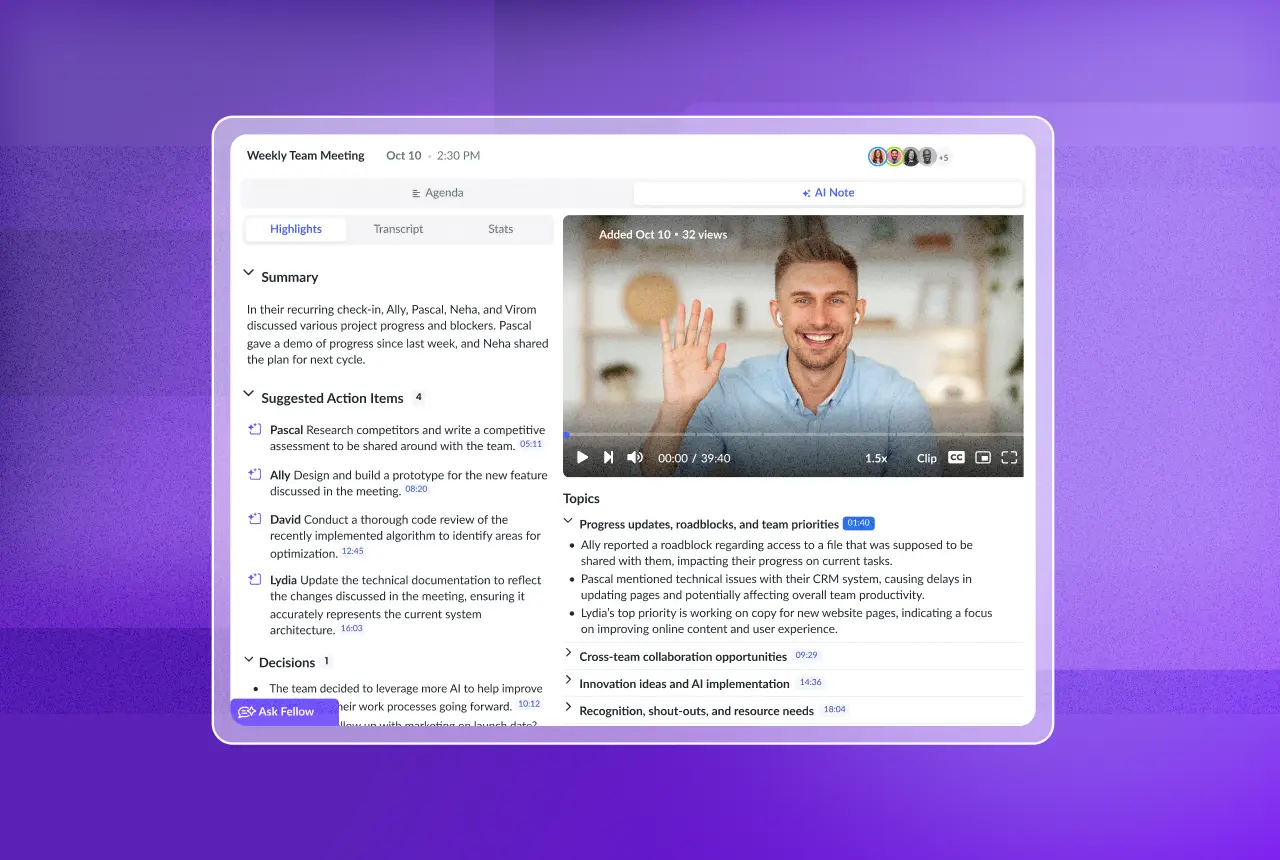
Fellow is an AI meeting minutes tool that automatically generates structured meeting summaries, action items, and decisions from any meeting, without manual note-taking.
Start a 14-day free trial today →
What are AI meeting minutes?
AI meeting minutes are structured summaries generated by artificial intelligence that capture the essential elements of a meeting: who attended, what was discussed, what decisions were made, and what actions were assigned. The AI listens to or processes the meeting recording, transcribes the conversation, then applies summarization algorithms to produce a coherent document.
This differs fundamentally from traditional meeting minutes in three ways:
Capture happens automatically. No one needs to split attention between participating and documenting.
Coverage is comprehensive. AI captures everything said, not just what someone remembered to write down.
Output is consistent. Every meeting follows the same format, making information retrieval predictable.
The technology behind AI meeting minutes combines several capabilities: speech-to-text transcription converts audio to text, speaker diarization identifies who said what, and large language models summarize content into structured formats. The result is AI meeting notes that read like a human wrote them but appear instantly after the meeting ends.
How AI meeting minutes work: the technology explained
AI meeting minutes rely on three core technologies working together:
Transcription
The foundation is accurate speech-to-text conversion. Modern transcription engines handle multiple speakers, accents, technical terminology, and crosstalk. Quality matters here because everything downstream depends on an accurate transcript. The best systems achieve 95%+ accuracy in clear audio conditions.
Summarization
Raw transcripts can run thousands of words for a single meeting. AI summarization condenses this into digestible content by identifying key points, grouping related discussions, and eliminating filler. The AI distinguishes between important decisions ("We're launching the feature on March 15") and tangential conversation.
Extraction
Beyond summarization, AI extracts structured data: action items with owners and due dates, decisions with context, questions that need follow-up. This structured extraction transforms passive documentation into actionable intelligence.
Why automate meeting documentation now?
The average professional attends 11-15 meetings per week. Manually documenting each one takes 15-30 minutes of post-meeting work. That's 3-7 hours weekly spent typing up what was said instead of acting on it.
But the real cost isn't time. It's lost information.
Manual notes capture maybe 30% of what matters. The note-taker's attention splits between listening and typing. Important details slip through. Exact phrasing gets paraphrased. Context vanishes. Three weeks later, nobody can remember exactly what was decided or why.
AI meeting minutes capture 100% of the conversation. Nothing gets lost because someone was talking while the note-taker was still writing the previous point. Every decision, commitment, and discussion point becomes searchable, permanent record.
For teams operating across time zones, this becomes critical. Someone in London who missed the 6 PM meeting can review the complete AI-generated summary the next morning without waiting for a colleague to "send notes."
If you're still losing context between meetings, Fellow was built specifically to solve this.
Start your free trial (no credit card required) →
What to look for in AI meeting minutes tools
Not all AI meeting minutes solutions deliver equal value. Here's what separates basic transcription from true meeting intelligence:
Accuracy and speaker identification
The tool should correctly attribute statements to speakers and handle industry-specific terminology. Look for tools that learn your team's vocabulary over time.
Structured output
Basic tools produce wall-of-text summaries. Better tools organize content into clear sections: key decisions, action items with owners, open questions, topics discussed. This structure makes information retrieval practical.
Searchability
Generating minutes is only half the value. The other half is finding information later. The best tools create a searchable recording library where you can query across all your meetings, not just review individual summaries.
Integration with existing workflows
Meeting minutes should flow into your actual work systems. Look for integrations with project management tools, CRMs, and communication platforms so action items become tasks and decisions reach stakeholders automatically.
Enterprise security
For organizations handling sensitive information, AI meeting minutes tools must meet compliance requirements. SOC 2 Type II certification, HIPAA compliance, and explicit policies against training AI on customer data are essential for enterprise adoption.
AI meeting minutes tools comparison
When evaluating AI meeting minutes solutions, the key differentiators come down to meeting-specific documentation quality, searchability across your organization, and security compliance. Here's how the leading options compare specifically for generating meeting minutes:
Tool | Best for | Key strength | Limitations |
|---|---|---|---|
Fellow | Enterprise teams needing organization-wide meeting intelligence | Ask Fellow lets you query across all meetings; flexible capture including botless recording and in-person meetings; SOC 2 Type II certified | More comprehensive than teams needing simple transcription |
Otter.ai | Individual users and small teams | Affordable pricing, real-time transcription | Limited organizational features, less structured outputs |
Fireflies.ai | Teams wanting conversation intelligence | Good analytics and sentiment analysis | Less focus on enterprise security |
Fathom | Individuals wanting free transcription | Free tier available, integrates with video platforms | Limited to individual use cases |
ClickUp AI | Teams already using ClickUp for project management | Native task creation from meeting notes | AI meeting features require paid AI add-on; transcription accuracy lags behind dedicated tools; less focus on meeting-specific workflows |
Fellow vs. ClickUp AI for meeting minutes
ClickUp AI offers meeting note capabilities as part of its broader AI add-on, but it's designed primarily as a project management tool rather than a dedicated AI meeting minutes solution. The transcription accuracy lags behind purpose-built tools, and the AI features require a paid add-on on top of existing ClickUp subscriptions. If your team already lives in ClickUp and needs basic meeting documentation, it can work. For organizations prioritizing comprehensive AI meeting minutes with strong integrations and enterprise security, Fellow provides deeper meeting-specific functionality.
Fellow vs. Otter.ai for meeting minutes
Otter.ai is ok for affordable, real-time transcription for individuals and small teams. However, it focuses on transcription rather than structured AI meeting minutes with decisions and action items clearly extracted. Otter lacks the organization-wide search capabilities that let you query across your entire meeting history. For personal note-taking, Otter works well. For team-wide meeting intelligence, Fellow offers more comprehensive documentation.
Fellow vs. Fireflies.ai for meeting minutes
Fireflies.ai provides good conversation analytics, making it ok for some teams analyzing customer calls. For structured AI meeting minutes with enterprise security requirements, Fellow provides stronger compliance credentials (privacy controls with SOC 2 Type II, HIPAA, and no training on customer data) and more flexible recording options including bot-free AI notetaking for in-person meetings.
Best for enterprise teams: Fellow combines core AI meeting minutes functionality with organization-wide search, enterprise security, and 50+ native integrations. Teams at Shopify, HubSpot, Vidyard, and Motive use Fellow to make their meetings searchable.
How to set up AI meeting minutes with Fellow
Getting started with automated meeting documentation takes minutes:
Connect your calendar. Fellow integrates with Google Calendar and Microsoft 365 to automatically detect upcoming meetings.
Configure recording preferences. Choose whether to record with or without a visible bot. Fellow supports Zoom, Google Meet, Microsoft Teams, Slack huddles, and even in-person meetings through mobile recording.
Set your summary format. Customize what your AI meeting minutes include: executive summary, detailed notes, action items, decisions, or all of the above.
Enable automatic distribution. Configure Fellow to automatically share meeting summaries with participants, ensuring everyone gets the same information without manual forwarding.
Connect your workflow tools. Link Fellow to your project management and CRM tools so action items flow directly into your existing systems.
Once configured, every meeting you attend generates AI meeting minutes automatically. No clicking "record," no post-meeting work. Just searchable documentation for every conversation.
How can different roles use AI meeting minutes?
For project managers
Track decisions and commitments across multiple projects without attending every meeting. Query your meeting history to find when a requirement changed or who agreed to a deadline. Use Ask Fellow to answer questions like "What blockers were mentioned in engineering standups this week?"
For sales teams
Document every customer call automatically. Capture objections, requirements, and next steps without breaking conversation flow. Search across all customer interactions to find specific competitive mentions or feature requests.
For executives
Review all-hands meetings, board discussions, and leadership syncs through comprehensive AI summaries. Maintain accountability by having a searchable record of commitments made across the organization.
For HR and legal
Create compliant documentation of interviews, performance discussions, and sensitive conversations. Privacy controls ensure appropriate access based on organizational roles.
What mistakes should you avoid when implementing AI meeting minutes?
Mistake 1: Choosing transcription over intelligence
Basic transcription gives you text. Meeting intelligence gives you answers. A tool that lets you ask "What did the customer say about our pricing?" delivers more value than one that makes you read through 10,000 words of transcript.
Mistake 2: Ignoring security requirements
Meeting recordings contain sensitive information: strategy discussions, personnel matters, customer data. Using consumer-grade tools for enterprise conversations creates compliance and security risks. Verify SOC 2 Type II certification and data handling policies before deployment.
Mistake 3: Not connecting to workflows
AI meeting minutes that sit in a separate system become another silo. Without integration to project management, CRM, and communication tools, action items still require manual transfer. Look for tools with 50+ native integrations or platforms like Zapier and n8n that extend connectivity to 8,000+ apps.
Mistake 4: Recording without consent
Meeting recording requires participant awareness. Configure your tool to provide clear notification when recording is active, and establish organizational policies for when recording is appropriate.
Get inspired by these Meeting Minutes Examples →
Frequently asked questions
What is the best app for AI meeting minutes?
The best app for AI meeting minutes depends on your team's specific needs, but enterprise teams consistently choose Fellow for its combination of accurate transcription, structured output, and organization-wide search capabilities. Fellow stands out because it generates comprehensive AI meeting minutes with clearly extracted decisions, action items with owners and due dates, and key discussion points, then makes all of this searchable across your entire meeting history through Ask Fellow. For teams prioritizing security, Fellow's SOC 2 Type II certification, HIPAA compliance, and commitment to never training on customer data provide essential enterprise-grade protection. Other strong options include Fireflies.ai for sales teams wanting conversation analytics and Otter.ai for individual users focused on affordability.
How accurate are AI meeting minutes?
Modern AI meeting minutes tools achieve 95%+ transcription accuracy in clear audio conditions. Accuracy depends on audio quality, speaker clarity, and how well the tool handles specialized terminology. The best tools improve accuracy over time by learning your team's vocabulary and common phrases. For critical documentation, most tools allow you to edit transcripts and summaries to correct any errors before distribution.
Are AI meeting minutes secure for business use?
Enterprise-grade AI meeting minutes tools provide robust security through SOC 2 Type II certification, HIPAA compliance for healthcare conversations, and GDPR compliance for European data protection. Critical security features include permission-based access aligned to organizational roles, encryption in transit and at rest, and explicit policies against training AI models on customer data. Fellow, for example, maintains all these certifications and never uses customer meetings to train its AI.
Can AI meeting minutes capture in-person meetings?
Yes, though this requires different capture methods than virtual meetings. Tools like Fellow support mobile recording for in-person meetings, capturing audio through your smartphone and generating the same AI meeting minutes you'd get from a video call. This extends automated documentation to all-hands meetings, interviews, client dinners, and any conversation worth documenting.
How do AI meeting minutes integrate with project management tools?
The best AI meeting minutes tools connect directly to project management platforms like Asana, Monday.com, Jira, and Linear. When AI extracts an action item from your meeting, it can automatically create a task in your project management system with the assigned owner and due date. Fellow offers 50+ native integrations plus connectivity to 8,000+ apps through Zapier and n8n, ensuring meeting outputs flow into your existing workflows.
What's the difference between AI meeting minutes and traditional meeting transcription?
Traditional meeting transcription produces a verbatim text record of everything said. AI meeting minutes go further by analyzing that text to produce structured summaries, extract action items, identify decisions, and organize content by topic. Transcription tells you what words were spoken; AI meeting minutes tell you what matters. The addition of searchability across multiple meetings transforms documentation from passive archive into queryable organizational intelligence.
Turn every meeting into searchable intelligence
AI meeting minutes eliminate the documentation burden that makes meetings feel like wasted time. When every conversation automatically becomes searchable, structured content, you stop losing context, decisions, and accountability.
Fellow turns meetings into shared organizational intelligence. Capture conversations across Zoom, Meet, Teams, in-person, and Slack huddles. Get AI meeting minutes automatically. Then use Ask Fellow to query across all your meetings: "What did we decide about the Q3 roadmap?" "Where are projects getting blocked?" "What commitments are at risk?"
SOC 2 Type II certified, HIPAA compliant, and Fellow never trains on your data. Join teams at Shopify, HubSpot, Vidyard, and Motive who've made their meetings searchable.
Record, transcribe and summarize every meeting with the only AI meeting assistant built with privacy and security in mind.