5 Professional Meeting Minutes Examples & Templates [Free 2026 Guide]
•
9
MIN READ

AI Summary by Fellow
We’ve all been there: it’s 4:00 PM, you’ve been in back-to-back Zooms all day, and you realize you have a mountain of Meeting Debt: a pile of decisions made but nothing actually written down. And while we all know we should send out minutes immediately, finding the time to do it manually feels impossible when your next call starts in thirty seconds. But the reality is: if the notes don't go out, the work doesn't move forward.
Why meeting minutes still matter
Meeting minutes aren’t just notes, they’re the record of what happened, what was decided, and what comes next. From boardrooms to sprint planning, they capture key details like topics discussed, decisions made, and action items so everyone stays aligned.
In many industries, minutes aren’t optional: they’re required. Many of our customers at Fellow work in highly regulated industries like government, healthcare, and finance, where meeting minutes are required for compliance and legal protection.
However, we also see teams outside these sectors rely on meeting minutes to stay accountable, avoid misunderstandings, and keep decisions moving work forward.
Who should be appointed to take meeting minutes?
Historically, the burden of note-taking fell on admins, project managers, or the person with the most junior title in the room. Smaller teams tried to "rotate the pain," but the result was always the same: the person writing the notes was too distracted to actually contribute to the brainstorm.
In 2026, the "designated note-taker" has evolved. High-performing teams now view documentation as a job for AI meeting agents. By offloading the mechanical task of recording and summarizing to a secure AI meeting notes tool like Fellow, you’re doing more than just saving time, you’re leveling the playing field.
When an AI agent handles the minutes, every human in the room (or on the screen) is free to be 100% present. Notetakers like Fellow doesn't just capture what was said; they identify the "why" behind decisions and instantly push action items to the right systems of record. This ensures that even those who couldn't make the call can "catch up" in seconds, keeping the whole team aligned without the administrative hangover.
7 best practices for great meeting minutes
Whether you’re still writing notes by hand or letting an AI assistant do the heavy lifting, the goal is the same: making sure that what was said in the room actually gets done. Here are seven ways to make your minutes more effective.
1. Recap the conversation
Instead of a play-by-play of the conversation, start your notes with a two-sentence summary: Why did we meet, and what did we settle? This helps busy colleagues get the gist in five seconds without having to dig through bullet points. An AI meeting assistant can automate this for you by generating a meeting recap.
2. Start with an agenda template
Standardized meeting templates are your best friend. Whether it’s a quick team check-in or a formal board review, using a consistent layout means you won't forget to list things like "next steps" or "deadlines." It makes your notes predictable and easy for others to scan.
3. Check off the "must-haves" for compliance
It sounds basic, but always include the date, who was there, and what was on the agenda. In fields like healthcare or finance, these small details are your safety net for compliance and record-keeping. This is something that an AI meeting assistant can also automate for you.
4. Focus on "who, what, and when"
The most common mistake is trying to write down everything everyone said. Instead, listen for the commitments. Clearly mark what was decided, who is responsible for the next step, and when they need to finish it. This turns "meeting notes" into an actual plan.
5. Let AI take the "busy work" off your plate
If you find it hard to listen and type at the same time, you aren't alone. Using a secure AI meeting assistant like Fellow to handle the recording and transcription means you can actually look people in the eye and participate. You’ll get a clean summary afterward, so you can spend your time doing the work instead of just documenting it.
6. Get the notes out while they’re "warm"
Meeting minutes lose their punch if they arrive three days later. Try to share the summary immediately while the conversation is still fresh in everyone’s mind. If you're using an AI assistant, this usually happens automatically, so the "follow-up" is done before you’ve even left the room. Fellow can also write follow up emails so you can send more context to teammates and clients immediately after the conversation.
7. Pick an AI note template that fits the meeting type
Not every meeting needs a formal report. A quick brainstorming session just needs a list of ideas, while a management update needs a list of risks. With Fellow’s AI note templates, you can choose a specific "style" for your notes, so the right people see the right information in a way that makes sense to them.
5 types of meeting minutes (with real examples)
Action-oriented meeting minutes
These focus almost entirely on decisions made and actions assigned. They leave out most of the discussion and capture who is responsible for what, along with deadlines.
Purpose: Capture tasks and responsibilities clearly.
Example:
Decision: Launch pilot of onboarding program on Oct 1.
Action Item 1: Sarah (Product) will finalize training materials by Sept 15.
Action Item 2: Alex (Marketing) to draft customer comms by Sept 20.
Action Item 3: Finance team to confirm budget allocation by Sept 10.
2. Discussion minutes
These provide a more detailed record of the conversation itself. They capture the flow of discussion, key points raised, arguments for and against, and context behind decisions.
Purpose: Provide context around decisions.
Example:
Topic: Training Materials
Sarah noted current documents are too technical. John suggested adding visuals and flowcharts. Group agreed this would make onboarding easier for non-technical users.
Topic: Marketing Communications
Alex raised concern that sending emails too early could confuse customers. The group decided to align comms timing with training completion.
Decision: Materials finalized by Sept 15; comms to be drafted by Sept 20.
3. Verbatim meeting minutes
A word-for-word transcript of everything said. Rarely used in everyday business because they’re long and hard to process, but common in legal, governmental, or high-stakes regulatory settings.
Purpose: Full word-for-word record (rare outside formal/legal settings).
Example:
Sarah: “The current documents are too technical for end users. I propose we create a simplified version with visuals.”
John: “Yes, but visuals will require design resources. Do we have bandwidth?”
Alex: “If we send communications too early, customers might expect access before the product is ready.”
Chair: “So, we’re agreeing: Sarah will finalize by Sept 15, Alex by Sept 20. Correct?”
Group: “Agreed.”
Decision-only minutes
These strip things down to just the outcomes: what decisions were made, with no record of the debate or reasoning. They’re short and efficient, but don’t provide context.
Purpose: Highlight outcomes only, no context.
Example:
Approved: Pilot launch date is Oct 1.
Approved: Training materials deadline is Sept 15.
Approved: Marketing comms deadline is Sept 20.
Approved: Budget allocation deadline is Sept 10.
Informal meeting minutes (or notes)
A lightweight version, often just a bulleted list of takeaways, reminders, and action items. These are common in startups, internal team meetings, or working groups where speed matters more than formality.
Purpose: Lightweight reminders, often for internal team use.
Example:
Pilot launch → Oct 1
Training → Sarah, Sept 15
Comms → Alex, Sept 20
Budget → Finance, Sept 10
Meeting minutes templates
Board meeting minutes
Ensure your next board meeting is collaborative, well-structured and efficient with this board meeting minutes template.

Project meeting minutes
Ideal for project managers and teams, this template helps share updates, discuss roadblocks, and assign tasks.

Staff meeting minutes
Run your weekly syncs like a pro with this template curated by award-winning SaaS founder coach, Dan Martell.

Improve the quality of your meeting minutes with AI
Writing and sharing minutes after every meeting keeps teams aligned, but it shouldn’t feel like another chore. That’s where automation comes in.
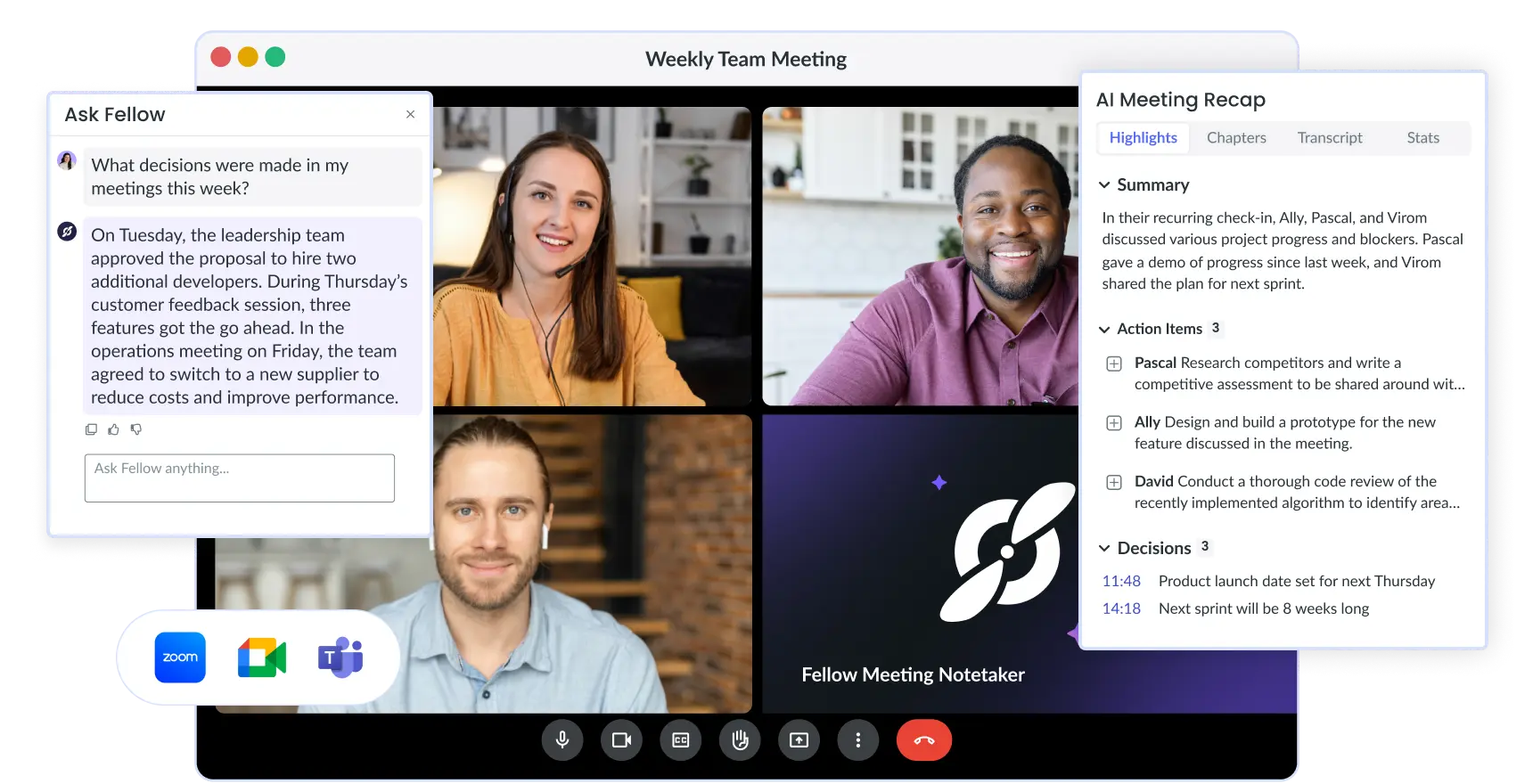
With Fellow’s AI meeting notetaker, minutes practically write themselves. You’ll get a clean recap with timestamps, key decisions, action items, and even suggested topics for your next session. Sensitive details? Fellow lets you permanently redact parts of the recording, summary, or transcript, so your documentation stays private and compliant, whether you’re in healthtech, finance, or tech.
🔐 Learn more about Fellow's privacy controls.
And if someone misses a call, they can simply ask Fellow what was discussed or which action items they own. No more scrambling to remember who said what: your team stays focused on decisions, while Fellow handles the documentation.
Frequently asked questions
Record, transcribe and summarize every meeting with the only AI meeting assistant built with privacy and security in mind.